
❤️mybatis-plus springboot配置xml文件不在resources文件夹下的解决方法--Invalid bound statement
异常
AbstractHandlerExceptionResolver.java:194 |org.springframework.web.servlet.mvc.method.annotation.ExceptionHandlerExceptionResolver |Resolved exception caused by handler execution: org.apache.ibatis.binding.BindingException: Invalid bound statement (not found): com.xx.mapper.xxMapper.xx
dao层编译后只有class文件,没有mapper.xml,因为maven工程在默认情况下src/main/java目录下的所有资源文件是不发布到target目录下的,
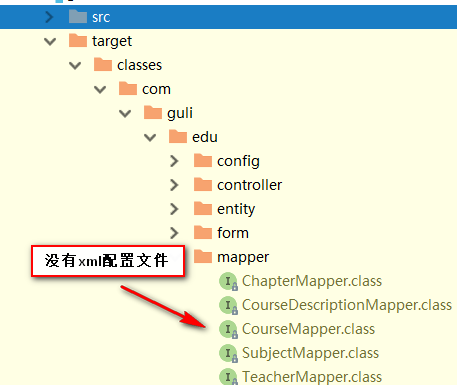
解决方法
1.xml文件放到resources文件夹下
2.通过配置pox.xml和属性文件。
pom文件配置(加入build里的内容到dependencies下边即可)
<?xml version="1.0" encoding="UTF-8"?>
<project xmlns="http://maven.apache.org/POM/4.0.0"
         xmlns:xsi="http://www.w3.org/2001/XMLSchema-instance"
         xsi:schemaLocation="http://maven.apache.org/POM/4.0.0 http://maven.apache.org/xsd/maven-4.0.0.xsd">
    <dependencies>
        <dependency>
            <groupId>junit</groupId>
            <artifactId>junit</artifactId>
            <version>4.12</version>
        </dependency>
    </dependencies>
    <build>
        <resources>
            <resource>
                <directory>src/main/java</directory>
                <includes>
                    <include>**/*.xml</include>
                </includes>
                <filtering>false</filtering>
            </resource>
        </resources>
    </build>
</project>
application.properties文件配置(路径即namespace路径加上xml文件路径的全类名)
#配置mapper xml文件的路径
mybatis-plus.mapper-locations=classpath:com/stu/eduservice/mapper/xml/*.xml